
A large context window is often advertised as one of the biggest advantages of modern Large Language Models (LLMs). You may have seen models claiming to support 128K, 200K, or even 1 million tokens.
But what does a context window actually mean? Why does its size matter? Does a larger context window always make a model better? And what exactly is a token?
Understanding these concepts is important when building applications using LLMs, particularly Retrieval-Augmented Generation (RAG) systems, AI agents, and conversational applications.
In this tutorial, we will explore how context windows work, how text is converted into tokens, how to estimate token consumption, and why simply increasing the amount of information provided to an LLM is not always a good idea.
1. What Is a Context Window?
A context window is the maximum amount of information an LLM can process within a single model interaction.
Think of it as the working memory of an LLM. It represents the information available to the model when generating a response.
For example, when you ask an LLM a question, it may receive several pieces of information:
- System instructions that define the model’s behavior.
- Conversation history containing previous messages.
- Retrieved documents containing relevant information.
- The current user question.
- Other contextual information supplied by an application.
The model uses this information to understand the request and generate an appropriate response.
The following diagram illustrates the different components that contribute to the context.
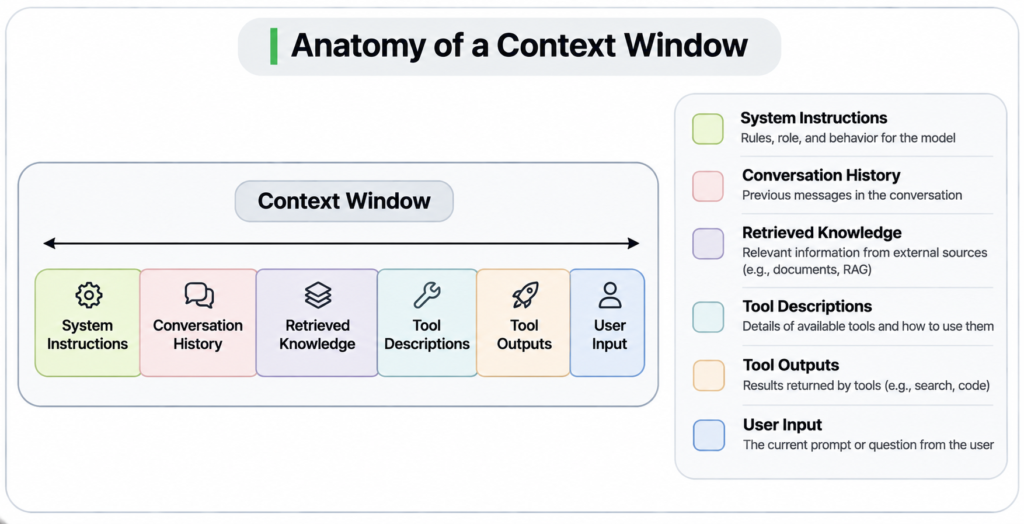
Components of a Context Window
Let’s understand these components individually.
System Prompt
The system prompt contains instructions that guide the model’s behavior. For example, an application might instruct an LLM to behave as a Java programming assistant and provide explanations with code examples.
Conversation History
In a conversational application, previous messages may be included so that the model can understand the ongoing discussion.
For example:
User: What is Spring Boot?
Assistant: Spring Boot is a Java framework…
User: What are its advantages?
The model needs the previous conversation to understand what the word “its” refers to.
Retrieved Documents
In a RAG application, relevant documents are retrieved from a knowledge base and provided to the model as additional context.
For example, when a user asks about an organization’s leave policy, the application might retrieve the relevant sections from the employee handbook.
Current User Question
This is the latest question or instruction submitted by the user.
Generated Response
The model generates its response using the available context.
An important detail is that generated output also consumes tokens. However, the exact accounting rules depend on the model and API. In many APIs, input and output tokens share the overall context capacity, while the API may additionally impose a separate maximum output-token limit.
Understanding the Context Window Budget
Suppose a model supports a context window of 200,000 tokens.
Your application provides:
| Component | Token consumption |
|---|---|
| System prompt | 5,000 |
| Conversation history | 30,000 |
| Retrieved documents | 100,000 |
| Current question | 5,000 |
| Total input | 140,000 |
If the model’s context limit includes both input and generated output, the theoretical remaining capacity is:
200,000 - 140,000 = 60,000Therefore, up to 60,000 tokens remain for the generated response, subject to the model’s separate output-token limit and API constraints.
This is why context-window capacity should be treated as a budget rather than an unlimited storage area.
2. What Is a Token?
Before exploring context-window limitations, we need to understand what a token actually is.A common misconception is that one token is equivalent to one word. This is not correct.
A token is a unit of text produced by a tokenizer. It can represent an entire word, part of a word, punctuation, whitespace, or other text fragments.
LLMs do not directly process ordinary text as humans read it. The text is first converted into tokens, and those tokens are subsequently mapped to numerical representations that the model can process.
Let’s understand this with a few examples.
Example 1: A Single Word
Consider the following text:
HelloA common English word like Hello may be represented as a single token.
Example 2: Multiple Words
Consider:
Hello worldThis might be represented as two tokens:
Token 1: Hello
Token 2: world
The space between the words is also part of the underlying text representation, but it does not necessarily become an independent token.
Example 3: Source Code
Now consider a simple JavaScript function:
function calculateTotal(price, quantity) {
    return price * quantity;
}
A tokenizer does not necessarily treat this entire function as a collection of ordinary words. It may split the source code into several tokens representing:
- Keywords such as
functionandreturn. - Identifiers such as
calculateTotal,price, andquantity. - Parentheses and braces.
- Operators such as
*. - Commas and semicolons.
Consequently, source code can consume a significant number of tokens even when it contains relatively few lines. This is particularly important when using LLMs for code analysis, code generation, and repository-level question answering.
3. How Does Tokenization Work?
Tokenization is the process of breaking text into smaller units called tokens. Most modern LLMs use subword tokenization techniques. Instead of maintaining a separate token for every possible word, tokenizers learn frequently occurring character sequences and word fragments.
This approach provides a balance between vocabulary size and the ability to represent unfamiliar words.
Consider the word:
TokenizationA tokenizer might represent it as:
Token + izationAnother tokenizer might represent the same word differently. The exact tokenization depends on the tokenizer associated with the model. This approach is useful because even if a tokenizer has never encountered a particular word, it can often represent it using smaller, known subword units.
For example:
unbelievableA tokenizer might split it into:
un + believe + ableThis is only an illustrative example; actual token boundaries vary between tokenizers.
Characters Are Not Equivalent to Tokens
There is no fixed relationship between the number of characters and the number of tokens. As a rough estimation for ordinary English text, developers often use:
This is a useful approximation, not a universal rule. The actual ratio depends on several factors:
- The language being used.
- The vocabulary and spelling of words.
- The tokenizer implementation.
- The presence of programming code.
- Special characters and formatting.
For example, Chinese text, source code, and unusual technical terminology can have very different character-to-token ratios. Therefore, character count should not be treated as an accurate measurement of token consumption.
4. Understanding Token Counts with Python
import tiktoken

# Initialize a tokenizer
encoding = tiktoken.get_encoding("cl100k_base")


def count_tokens(text):
    """Count the actual tokens in the given text."""
    return len(encoding.encode(text))


def estimate_tokens(text):
    """Estimate tokens using approximately 4 characters per token."""
    return len(text) / 4


def demonstrate_tokenization(text):
    tokens = encoding.encode(text)

    print("Text:", text)
    print("Characters:", len(text))
    print("Actual tokens:", len(tokens))
    print("Estimated tokens:", round(estimate_tokens(text), 2))
    print("Token IDs:", tokens)
    print("Decoded tokens:", [encoding.decode([t]) for t in tokens])
    print("-" * 60)


examples = [
    "Hello",
    "Hello world",
    "Large Language Models",
    "Tokenization",
    "function calculateTotal(price, quantity) { return price * quantity; }"
]

for example in examples:
    demonstrate_tokenization(example)
Output
Text: Hello
Characters: 5
Actual tokens: 1
Estimated tokens: 1.25
Token IDs: [9906]
Decoded tokens: ['Hello']
------------------------------------------------------------
Text: Hello world
Characters: 11
Actual tokens: 2
Estimated tokens: 2.75
Token IDs: [9906, 1917]
Decoded tokens: ['Hello', ' world']
------------------------------------------------------------
Text: Large Language Models
Characters: 21
Actual tokens: 3
Estimated tokens: 5.25
Token IDs: [35353, 11688, 27972]
Decoded tokens: ['Large', ' Language', ' Models']
------------------------------------------------------------
Text: Tokenization
Characters: 12
Actual tokens: 2
Estimated tokens: 3.0
Token IDs: [3404, 2065]
Decoded tokens: ['Token', 'ization']
------------------------------------------------------------
Text: function calculateTotal(price, quantity) { return price * quantity; }
Characters: 69
Actual tokens: 14
Estimated tokens: 17.25
Token IDs: [1723, 11294, 7749, 45846, 11, 12472, 8, 314, 471, 3430, 353, 12472, 26, 335]
Decoded tokens: ['function', ' calculate', 'Total', '(price', ',', ' quantity', ')', ' {', ' return', ' price', ' *', ' quantity', ';', ' }']
------------------------------------------------------------
The cl100k_base encoding is used by several OpenAI model families. It is important to understand that this is only an example tokenizer. Other models may use completely different tokenization schemes.
5. Understanding Context Window Consumption
Now that we understand tokenization, let’s revisit the context window.
Suppose we are building a RAG application that uses an LLM with a context window of 200,000 tokens.Whenever a user submits a question, our application constructs a prompt containing system instructions, conversation history, retrieved documents, and the current question.
Assume the following token consumption:
| Context component | Tokens |
|---|---|
| System prompt | 32 |
| Conversation history | 64 |
| Retrieved documents | 54 |
| Current question | 23 |
| Total input tokens | 173 |
The total input consumption is:
If the context window is 200,000 tokens, the remaining theoretical capacity is:
The utilization is:
In this example, we are using less than 0.1% of the available context window. This demonstrates how a context window acts as a token budget. Every additional piece of information included in the prompt contributes to that budget.
6. Why a Bigger Context Window Is Not Always Better
At first glance, a larger context window seems like an obvious advantage.
If one model supports 200K tokens and another supports 1 million tokens, the second model appears to have a significant advantage. It can potentially process much larger documents, longer conversations, and more extensive collections of information in one interaction. However, context-window size alone does not determine how effectively a model uses the information it receives.
There are two important considerations.
6.1 Cost of Processing More Tokens
Processing a larger amount of input generally increases the computational resources required by the model. Many LLM APIs charge based on input and output token consumption. Some also have different pricing for cached input tokens or other usage categories.
Consider two requests:
| Request | Input tokens | Output tokens |
|---|---|---|
| Request A | 5,000 | 1,000 |
| Request B | 100,000 | 1,000 |
Request B processes significantly more input tokens. Even though both requests generate the same number of output tokens, the second request will generally be more expensive under token-based pricing. Therefore, unnecessarily adding large amounts of information to a prompt can increase application costs.
6.2 Competition for the Model’s Attention
There is another important consideration: how effectively a model uses information distributed across a large context. A model does not necessarily give equal importance to every piece of information in its context.
For example, suppose we provide an LLM with:
- A system instruction.
- A 100-page technical document.
- Several previous conversations.
- A large collection of retrieved documents.
- A question about a specific paragraph.
The relevant information may be surrounded by thousands of unrelated details. Although the model can technically process the entire context, identifying and correctly using the most relevant information can become more difficult. This is related to a phenomenon commonly discussed as Lost in the Middle.
Research has shown that some models perform better when relevant information appears near the beginning or end of a long context, while information placed in the middle can be harder to retrieve reliably. This does not mean that every additional token directly reduces attention in a simple mathematical way. Rather, longer contexts can introduce challenges in information retrieval, relevance, and effective utilization.
This is why simply providing more information does not guarantee better answers. The objective should be to provide the right information, in the right amount, at the right time.
7. Why Context Engineering Matters
The discussion above leads us to an important concept: Context Engineering. Context engineering is the practice of designing and managing the information supplied to an LLM so that it has the necessary context to complete a task effectively.
It goes beyond writing a good prompt. For example, consider a RAG application that contains 10,000 technical documents. When a user asks a question, we should not blindly send all 10,000 documents to the LLM.
Instead, we should:
- Retrieve documents relevant to the user’s question.
- Rank the retrieved documents by relevance.
- Remove irrelevant or duplicate information.
- Limit the amount of context sent to the LLM.
- Organize the remaining information clearly.
- Include the user’s question and necessary instructions.
This approach helps control token consumption while improving the relevance of the information available to the model.
Context engineering becomes particularly important when developing:
- Retrieval-Augmented Generation (RAG) applications.
- AI agents that interact with multiple tools.
- Conversational applications with long histories.
- Code assistants that analyze large repositories.
- Enterprise applications that process large documents.
A well-designed context can often be more valuable than simply selecting a model with a larger context window.
8. Context Window vs. Maximum Output Tokens
One more distinction is worth understanding. The context window and maximum output tokens are related, but they are not necessarily the same thing.
Context window represents the amount of context a model can handle in an interaction.
Maximum output tokens represents the maximum number of tokens the model is allowed to generate in its response.
For example, imagine an API with the following limits:
| Parameter | Limit |
|---|---|
| Context window | 200,000 tokens |
| Maximum output tokens | 16,000 tokens |
Suppose the request contains 50,000 input tokens. Even though the theoretical remaining context capacity is 150,000 tokens, the model cannot necessarily generate 150,000 output tokens. Its output is restricted by the separate maximum output limit of 16,000 tokens.
Actual API behavior also depends on provider-specific limits and token accounting rules. This distinction is important when building applications that generate lengthy reports, summarize documents, or produce large code files.