1. What Is LangServe?
LangServe is an official tool from the LangChain ecosystem that lets you expose LangChain chains and runnables as REST APIs with almost no extra code.
In simple terms: LangServe turns your LangChain logic into a production-ready API.
2. Why LangServe Exists?
When you build an LLM app using LangChain, you usually end up with:
- Prompt templates
- An LLM (OpenAI, Groq, etc.)
- Output parsers
- Chains or LCEL pipelines
LangServe solves the next problem: How do I make this usable by a frontend, mobile app, or another service?
Instead of writing API glue code yourself, LangServe does it automatically.
3. How LangServe Works
LangServe sits between FastAPI and LangChain and acts as a bridge that turns LangChain logic into HTTP APIs automatically. At its core, LangServe answers this question:
“Given a LangChain runnable, how can I safely, consistently, and automatically expose it over HTTP?”
3.1 FastAPI: The Web Framework Layer
LangServe is built on top of FastAPI, not a replacement for it.
FastAPI provides:
- HTTP routing (
GET,POST) - Request validation
- Response serialization
- Automatic OpenAPI / Swagger docs
- Async performance
LangServe does not re-implement any of this. Instead, it uses FastAPI as the HTTP engine and focuses only on LangChain-specific behavior. So when you create:
FastAPI app
You are creating the web server foundation on which LangServe operates.
3.2 LangChain Runnable: The Execution Layer
A LangChain runnable (or chain) represents pure business logic.
Conceptually, it is a function:
Input → Prompt → LLM → Parser → Output
Important properties of runnables:
- They define input schema
- They define output schema
- They can be executed synchronously, in batch, or as a stream
- They are independent of HTTP, JSON, or APIs
LangServe does not change your chain at all. It only wraps it. This separation is critical:
LangServe = transport (HTTP)
LangChain = logic
3.3 add_routes(): The Glue Layer
add_routes() is where the magic happens. When you call:
add_routes(app, chain, path="/chain")
LangServe does several things internally.
3.4 Schema Introspection
LangServe inspects your runnable and automatically extracts:
- What inputs it expects
- What outputs it returns
- Whether it supports streaming
- Whether it supports batch execution
This is possible because LangChain runnables are self-describing. From this, LangServe builds:
- Input validation rules
- Output schemas
- OpenAPI documentation
You never write this yourself.
3.5 Automatic Endpoint Generation
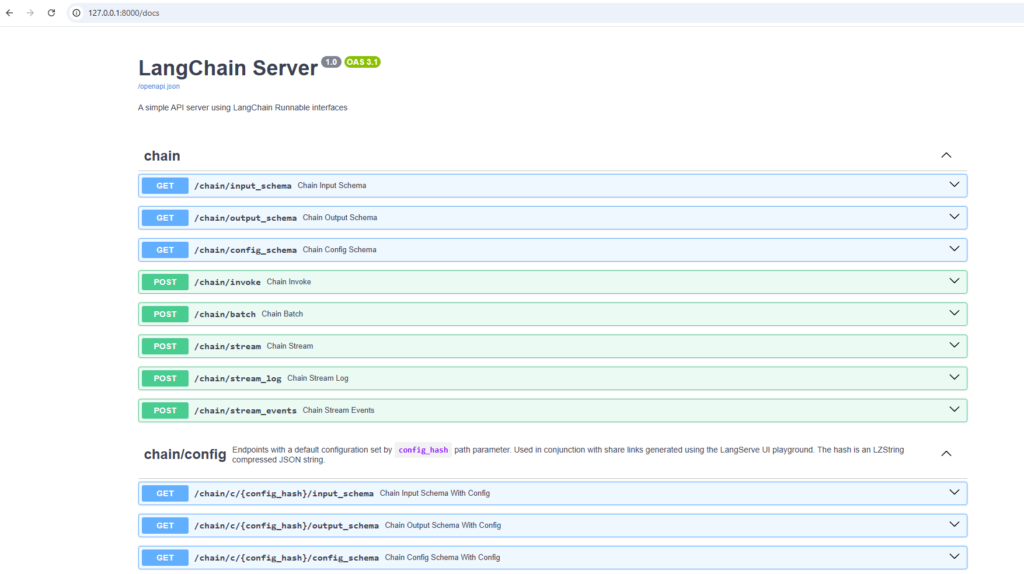
Based on the runnable’s capabilities, LangServe creates multiple FastAPI routes. Conceptually:
/chain/invoke
    → runs chain once

/chain/batch
    → runs chain on list of inputs

/chain/stream
    → streams tokens using SSE

/chain/input_schema
    → returns expected input structure

/chain/output_schema
    → returns response structure
Each of these routes:
- Calls the runnable internally
- Handles async execution
- Converts input/output to JSON
- Handles errors consistently
You didn’t define these routes — LangServe did.
3.6 Request Lifecycle
Let’s say a client calls:
POST /chain/invoke
Internally, LangServe does this:
- Receives JSON request via FastAPI
- Validates it against the runnable’s input schema
- Converts JSON → Python objects
- Calls:
chain.invoke(input) - Collects the output
- Serializes output → JSON
- Sends HTTP response
This entire pipeline is generic and reusable for any runnable.
3.7 Streaming Support (Why SSE Is Required)
For streaming endpoints:
/chain/stream
LangServe:
- Executes the runnable token-by-token
- Emits tokens using Server-Sent Events (SSE)
- Keeps the HTTP connection open
- Sends incremental updates to the client
That’s why sse-starlette is required.
3.8 Documentation Comes for Free
Because FastAPI is underneath:
- OpenAPI spec is auto-generated
- Swagger UI (
/docs) is available instantly - Frontend teams can explore APIs without backend help
This is a huge productivity gain.
3.9 Mental Model
Client
  ↓
FastAPI (HTTP, validation, docs)
  ↓
LangServe (route + schema generation)
  ↓
LangChain Runnable (business logic)
  ↓
LLM
Each layer has a single responsibility.
4. Dependencies
Following are the dependencies needed to work with our example:
fastapi
uvicorn
langserve
sse-starlette
5. Example
Following is a working example server.py:
import os
from dotenv import load_dotenv

from fastapi import FastAPI
import uvicorn

from langchain_core.prompts import ChatPromptTemplate
from langchain_core.output_parsers import StrOutputParser
from langchain_groq import ChatGroq

from langserve import add_routes

# --------------------------------------------------
# Load environment variables
# --------------------------------------------------
load_dotenv()

GROQ_API_KEY = os.getenv("GROQ_API_KEY")

# --------------------------------------------------
# Initialize LLM (Groq)
# --------------------------------------------------
model = ChatGroq(
    api_key=GROQ_API_KEY,
    model="llama3-8b-8192"
)

# --------------------------------------------------
# Create Prompt Template
# --------------------------------------------------
prompt = ChatPromptTemplate.from_messages(
    [
        ("system", "Translate the following text into the given language."),
        ("user", "Language: {language}\nText: {text}")
    ]
)

# --------------------------------------------------
# Output Parser
# --------------------------------------------------
parser = StrOutputParser()

# --------------------------------------------------
# Create LCEL Chain
# --------------------------------------------------
chain = prompt | model | parser

# --------------------------------------------------
# Create FastAPI App
# --------------------------------------------------
app = FastAPI(
    title="LangChain Server",
    version="1.0",
    description="A simple API server using LangChain Runnable interfaces"
)

# --------------------------------------------------
# Add LangServe Routes
# --------------------------------------------------
add_routes(
    app,
    chain,
    path="/chain"
)

# --------------------------------------------------
# Application Entry Point
# --------------------------------------------------
if __name__ == "__main__":
    uvicorn.run(
        app,
        host="127.0.0.1",
        port=8000
    )
Once you run the application, following will be the output on the console:
>python server.py
INFO:     Started server process [25708]
INFO:     Waiting for application startup.

     __          ___      .__   __.   _______      _______. _______ .______     ____    ____  _______
    |  |        /   \     |  \ |  |  /  _____|    /       ||   ____||   _  \    \   \  /   / |   ____|
    |  |       /  ^  \    |   \|  | |  |  __     |   (----`|  |__   |  |_)  |    \   \/   /  |  |__
    |  |      /  /_\  \   |  . `  | |  | |_ |     \   \    |   __|  |      /      \      /   |   __|
    |  `----./  _____  \  |  |\   | |  |__| | .----)   |   |  |____ |  |\  \----.  \    /    |  |____
    |_______/__/     \__\ |__| \__|  \______| |_______/    |_______|| _| `._____|   \__/     |_______|

LANGSERVE: Playground for chain "/chain/" is live at:
LANGSERVE:  │
LANGSERVE:  └──> /chain/playground/
LANGSERVE:
LANGSERVE: See all available routes at /docs/
INFO:     Application startup complete.
INFO:     Uvicorn running on http://127.0.0.1:8000 (Press CTRL+C to quit)
Now you can access the swagger at http://127.0.0.1:8000/docs